How To Fix Drawing Tablet Stylus Grip Rubber Stretching?
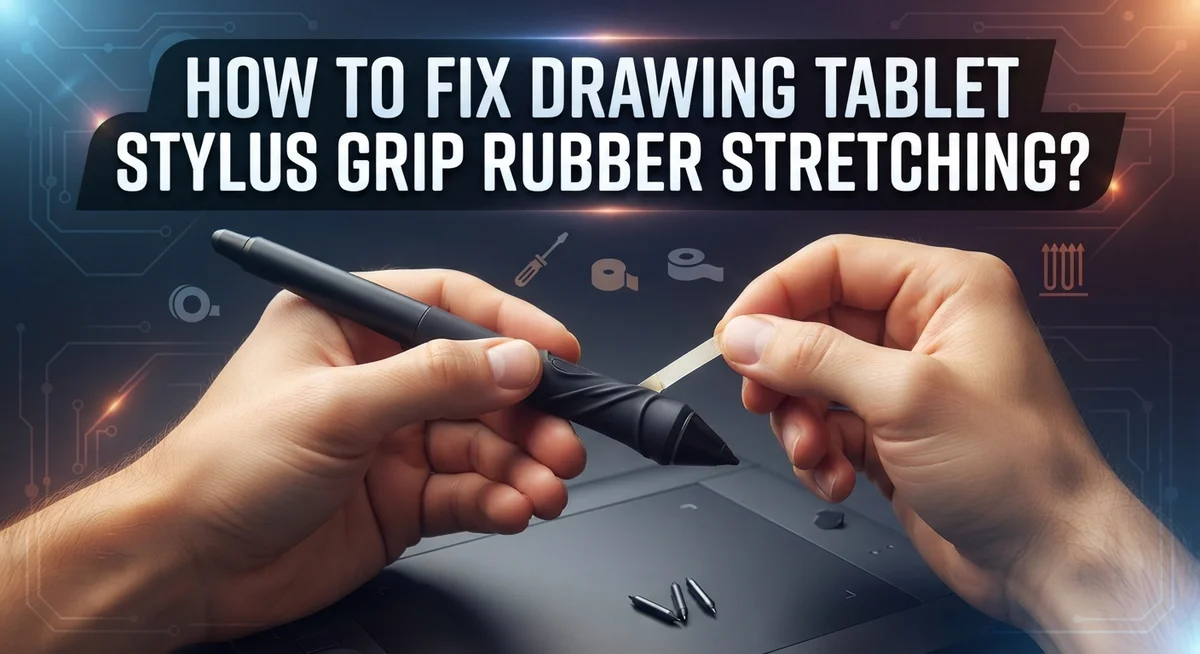
Your drawing tablet stylus feels different lately. The rubber grip seems loose. It might even look stretched or slightly split.
This is a common problem for digital artists. Both Wacom and Huion users report this issue often. The rubber material simply wears down with regular use.
Don’t worry though. This does not mean your stylus is broken beyond repair.
Grip stretching happens for a few clear reasons. Tight gripping habits speed up the damage. Dirt and oils from your hands also break down the rubber over time.
The good news? You can fix this problem yourself. You can also prevent it from happening again.
This guide covers everything you need to know. We will show you simple cleaning methods first. Then we explain how to request replacement grips from your manufacturer.
You will also learn proper gripping techniques. These techniques reduce strain on your stylus. We cover pressure settings and holding angles too.
By the end, you will understand why this happens. More importantly, you will know exactly how to stop it. Let’s get your stylus feeling comfortable again.
In a Nutshell
Here’s a quick recap of what you need to know about stylus grip stretching:
-
Rubber grips wear out naturally. Regular use causes them to loosen, stretch, and sometimes split over time. This happens across many tablet brands.
-
Cleaning helps a lot. Wipe your grip with rubbing alcohol or a mild glass cleaner. This removes oils and dirt that speed up rubber breakdown.
-
Replacement grips are available. Most manufacturers offer new grips if yours becomes too damaged to fix.
-
Your grip pressure matters. Holding your stylus too tight puts extra strain on the rubber. This makes it wear out faster.
-
Small adjustments prevent big problems. Changing your holding angle and checking pen pressure settings can reduce daily wear significantly.
-
Catch issues early. Don’t ignore small signs of loosening. Fixing minor stretching now stops bigger splits later.
-
Environmental factors play a role too. Things like smoke exposure can contribute to faster deterioration of rubber grips.
Follow these simple steps, and your stylus grip will last much longer with less frustration.
Why Stylus Grip Rubber Stretches and Loosens Over Time
Rubber grips stretch because they experience constant pressure and friction from your hand. Every time you hold your stylus, the rubber material flexes and slowly loses its original shape.
Heat and humidity play a big role in grip degradation. Warm environments cause rubber to soften and expand. If you work in a hot room or store your tablet in direct sunlight, the grip material breaks down faster. Humidity also affects rubber by making it sticky and more prone to stretching.
Regular use is the main culprit. Digital artists who work for hours daily put continuous strain on the grip. The rubber fibers gradually loosen and separate from the core material beneath. This process happens naturally with all rubber products over time.
Grip pressure matters too. When you squeeze your stylus too hard, you accelerate the stretching process. Excessive force compresses the rubber and causes permanent deformation. Even small increases in grip tension add up over months of use.
Moisture and sweat from your hands speed up deterioration. Salty perspiration weakens rubber compounds and makes them sticky. This stickiness then attracts dust and dirt, which further damages the material.
Environmental factors like smoke and pollution can also contribute. Particles in the air settle on grips and break down the rubber surface. This is especially true if you smoke indoors or work in dusty spaces.
Age of the stylus matters as well. Older stylus models often have lower quality grip materials that degrade faster than newer designs. Manufacturing improvements have made modern grips more durable, but they still stretch eventually.
Understanding these causes helps you take better care of your equipment. You cannot stop rubber from aging, but you can slow down the process significantly through proper maintenance and smart usage habits.
Signs Your Stylus Grip Needs Attention
Your stylus grip shows several warning signs when it needs attention. Recognizing these early signals helps you prevent bigger problems down the road.
Visible looseness is the first thing to notice. When you hold your stylus, the rubber should feel snug and secure. If the grip slides around on the barrel or feels like it might slip off, that’s your cue to act. This loosening happens gradually, so check your grip regularly during your work sessions.
Texture changes matter too. A healthy grip feels consistent and offers good friction against your fingers. If the surface becomes sticky, slippery, or uneven, something is wrong. Sometimes the rubber develops a tacky feeling that makes it harder to control your stylus precisely.
Visible damage is impossible to miss. Look for small cracks, splits, or areas where the rubber has started to peel away from the barrel. Even tiny tears can grow larger with continued use. Discoloration or darkening of the grip material also indicates deterioration.
Discomfort during use sends a clear message. If you notice your hand gets tired faster than usual or you feel pressure points where the grip meets your fingers, the rubber may have lost its cushioning. Your grip might feel harder or less forgiving than before.
Reduced grip control affects your drawing quality. When your stylus feels less stable in your hand, you might compensate by squeezing harder. This creates a cycle that damages the grip further.
Pay attention to how your stylus feels in your hand during daily use. Small changes in texture, fit, or comfort are your body’s way of telling you something needs fixing. Catching these signs early means you can address the problem before the grip becomes completely unusable. Regular inspection takes just a few seconds and saves you from frustration later.
Step-by-Step: Cleaning and Restoring a Loose Grip
Start by gathering what you need. You’ll want rubbing alcohol, a soft cloth, and warm water. These simple items work well for most grip cleaning tasks.
Dampen your cloth with rubbing alcohol. Gently wipe the entire grip surface. Use circular motions to remove dirt, oils, and sticky residue. Alcohol evaporates quickly, so your stylus dries fast.
For stubborn buildup, try a mild glass cleaner instead. Spray a small amount on your cloth. Wipe the grip thoroughly. Avoid spraying directly on the stylus, as liquid can damage internal components.
Let the grip air dry completely. This takes about five to ten minutes. Don’t use your stylus until it’s fully dry.
Once clean, assess the grip condition. Slight looseness often improves after cleaning. Dirt and grime can make grips feel worse than they actually are. You might find the grip feels better once you remove the buildup.
For grips that remain loose after cleaning, try wrapping the base with thin tape. Medical tape or athletic tape works well. Wrap it snugly around the grip’s bottom edge. This adds thickness and can reduce movement.
Test the feel in your hand. The grip should feel secure but not uncomfortable. You may need to adjust the tape amount.
If wrapping doesn’t help, contact your tablet manufacturer. Most companies offer replacement grips at no cost or low cost. They understand that grips wear out naturally. Requesting replacements is a normal part of stylus maintenance.
While your grip is clean, examine your holding technique. Are you gripping too tightly? Relaxing your grip reduces future stretching. Hold your stylus like you hold a regular pen. Your hand should feel comfortable, not tense.
Regular cleaning prevents many grip problems. Clean your stylus grip monthly. This simple habit keeps rubber in better condition and extends the life of your equipment.
How To Request or Install Replacement Grips
When your stylus grip has stretched beyond cleaning and simple fixes, reaching out to the manufacturer is your best option. Most tablet companies offer replacement grips as separate parts you can order directly from them.
Contact the manufacturer’s support team first. You’ll find their contact information on the official website. Have your stylus model number ready when you reach out. The support team can confirm whether replacement grips are available for your specific stylus. They may ask about your purchase date and warranty status.
Many manufacturers ship replacement grips at no cost if your stylus is still under warranty. Even after warranty expires, replacement grips typically cost very little. The company will provide shipping details and installation instructions. Some brands offer replacement grips as a standard accessory you can purchase anytime.
Installing replacement grips is straightforward. Most grips slide onto the barrel of your stylus. Simply pull the old grip off gently. Clean any adhesive residue from the stylus barrel using rubbing alcohol. Let it dry completely before sliding the new grip into place. Push it down firmly until it sits snugly against the stylus body.
Take time to check the grip fit before using your stylus. It should feel secure and not shift when you hold it. If the grip feels loose after installation, remove it and check the barrel for debris. A clean barrel ensures the grip stays in place.
Some stylus models use grips that glue permanently to the barrel. In these cases, you may need to contact the manufacturer for professional replacement or purchase a new stylus model with improved grip materials. Ask the support team which option works best for your stylus.
Keeping the manufacturer’s contact information saved makes future replacements quick and easy.
Adjusting Pen Pressure and Holding Technique to Reduce Wear
Your pen pressure settings and holding technique directly affect how quickly your stylus grip wears down. When you apply too much pressure, you squeeze the rubber harder, which accelerates stretching and degradation. Reducing your pressure sensitivity helps protect the grip from unnecessary strain.
Start by checking your tablet software settings. Most drawing tablets let you adjust pressure curves and sensitivity levels. Lower pressure requirements mean you don’t need to grip as tightly during work sessions. This simple change can significantly extend your grip’s lifespan.
Holding angle matters more than you might think. Many artists grip their stylus at steep angles, which concentrates force on one side of the rubber. Try adjusting your grip to a more neutral angle, around 45 degrees from your tablet surface. This distributes pressure more evenly across the entire grip circumference.
Your grip strength during drawing also plays a key role. Tight gripping accelerates rubber degradation and causes discomfort in your hand and wrist. Practice holding your stylus with a relaxed grip, similar to how you’d hold a regular pen. You only need enough pressure to keep the stylus steady, not to squeeze it.
Pay attention to your hand position during long sessions. Awkward postures force you to grip tighter to compensate. Sit with your tablet at a comfortable angle. Keep your wrist straight and your arm supported. These adjustments reduce the urge to clench your stylus.
Test different grip positions on scrap paper first. Notice which angle and pressure level feel most natural. Once you find your comfortable setup, your grip rubber will experience less stress. This preventive approach works alongside cleaning and maintenance to keep your stylus in better condition for longer periods.
Common Mistakes That Speed Up Grip Deterioration
Gripping your stylus too tightly is the fastest way to damage the rubber. When you squeeze hard, you compress the rubber material repeatedly. This constant pressure breaks down the elasticity and causes permanent stretching.
Many artists don’t realize they grip harder during detailed work. Your hand naturally tightens when you focus on precision tasks. The rubber gets stressed more with each drawing session. Over time, this leads to visible loosening and splitting.
Ignoring early warning signs makes the problem worse. When you first notice the grip feeling slightly loose, that’s your signal to act. Most people wait until the grip splits completely before taking steps. By then, the damage is already severe and harder to reverse.
Holding your stylus at extreme angles also accelerates wear. If you angle it too steeply against the tablet surface, pressure concentrates on one side of the grip. The rubber stretches unevenly. This creates weak spots that split faster than normal.
Poor posture during long drawing sessions forces you to grip tighter. When your arm or wrist is in an awkward position, your hand compensates by squeezing harder. Your forearm muscles fatigue, and your grip strength increases automatically. This tension transfers directly to the rubber material.
Smoking near your workspace can contribute to grip deterioration. Tar and nicotine residue makes rubber sticky and brittle. The material loses flexibility more quickly than it would in a clean environment.
Humidity also plays a role in grip breakdown. High moisture causes rubber to swell and lose its original shape. Low humidity makes it crack and become brittle. Extreme temperature swings in your workspace speed up this process too.
The key is awareness. Pay attention to how firmly you hold your stylus. Notice your posture during work. Address loose grips immediately instead of waiting. Small adjustments to your technique prevent most grip problems before they start.
Long-Term Care and Storage Tips for Stylus Grips
Storing your stylus correctly is one of the best ways to prevent grip rubber from stretching and deteriorating. Keep your pen in a cool, dry place away from direct sunlight. Heat and UV light break down rubber compounds over time, causing them to become sticky and lose their shape.
Avoid storing your stylus in humid environments. Moisture speeds up rubber degradation and can cause the grip to swell or become tacky. If you live in a humid climate, consider using a small storage box with silica gel packets to absorb excess moisture around your pen.
Store your stylus horizontally or vertically, but never at an angle where the grip bears weight. Hanging it tip down or placing it on its side under pressure causes the rubber to stretch permanently. A pen holder or small case keeps your stylus protected and prevents unnecessary strain on the grip material.
Keep your stylus away from extreme temperature changes. Moving your pen between hot and cold environments causes the rubber to expand and contract, weakening its structure over time. This is especially important if you travel with your tablet or work in different rooms.
Separate your stylus from other tools in your workspace. Metal pens, pencils, and sharp objects can puncture or tear the grip if they rub against it. A dedicated storage spot prevents accidental damage and keeps your stylus in better condition.
Check your stylus regularly during storage. Look for any signs of stickiness, discoloration, or loose areas. Catching these early warnings lets you address the problem before the grip deteriorates further.
Store replacement grips properly too. Keep extra grips in their original packaging in a cool, dry drawer. This ensures they stay in good condition if you need them later. Proper storage habits extend the life of both your current stylus and any backups you keep on hand.
Final Thoughts
Stylus grip rubber stretching happens to almost every artist. It’s a normal part of owning a drawing tablet. Knowing this can save you stress and frustration.
The good news is that you have real control over this problem. Small habits make a big difference over time. Simple changes often prevent major damage.
Clean your grip often with rubbing alcohol. This removes oils and dirt that speed up wear. It also keeps the rubber feeling fresh longer.
Watch how you hold your stylus each day. Loosen your grip when you can. Your hands and your tablet will both thank you.
Replace grips as soon as you notice real damage. Waiting only makes things worse. Manufacturers often provide replacement parts for this exact reason.
Store your stylus properly between sessions. This single habit prevents a lot of unnecessary stretching. It takes only seconds to do right.
Remember that some wear is simply unavoidable. Rubber degrades naturally over months and years. This doesn’t mean you did anything wrong.
Your goal is to slow down the process, not stop it completely. Every small fix adds up over time. Consistency matters more than perfection here.
If your grip feels loose today, don’t panic. Try the fixes covered in this guide first. Most problems have simple, practical solutions.
Think of grip care as routine maintenance, not an emergency task. Just like cleaning your screen, it becomes second nature. A few minutes now saves bigger headaches later.
Your drawing tools deserve simple, steady care. With the right habits, your stylus grip can last much longer. That means more time drawing and less time worrying about your equipment.
Frequently Asked Questions
Is grip warping normal for all stylus brands?
Yes, grip warping is completely normal. Artists using different tablet brands experience this issue regularly. The rubber material stretches naturally over time with consistent use. This doesn’t mean your stylus is defective. It simply means the grip material has reached its wear cycle.
Can I get replacement grips from the manufacturer?
Most manufacturers offer replacement grips as separate accessories. You can contact the company that made your stylus directly. They typically provide grip replacements at reasonable costs. Some brands even include spare grips with new stylus purchases. Check the manufacturer’s website for their replacement parts section.
Why does my grip feel sticky even after cleaning?
Sticky grips often come from residue buildup. Rubbing alcohol or window cleaner removes most sticky substances. If stickiness returns quickly, environmental factors may be at play. Humidity, dust, and oils from your hands accumulate on the rubber surface. Regular cleaning every few weeks keeps the grip fresh and comfortable.
Does holding pressure affect how fast grips stretch?
Absolutely. Gripping too tightly accelerates rubber degradation significantly. When you squeeze harder, you put extra stress on the material. This causes faster stretching and splitting. Lighter grip pressure means your stylus lasts longer. Try holding your stylus like you’d hold a pencil. Your hand should feel relaxed, not tense.
What’s the best way to know when a grip needs replacing?
Watch for visible cracks or deep splits in the rubber. If the grip slides around on the barrel, replacement time has arrived. Noticeable looseness means the rubber has stretched beyond its useful life. Don’t wait until the grip falls off completely. Replace it once you notice real damage developing.

Hi, I’m Jessamine Rowell, the founder and voice behind ResizeMake (https://resizemake.com/), a space where I share my love for technology with the world. I write detailed and honest reviews on the latest tech products, gadgets, electronic devices, and trending Amazon items to help readers make smarter buying decisions.