How To Fix Liquid CPU Cooler Radiator Fin Bending?
Did you just unbox your new liquid CPU cooler and spot a bent fin on the radiator? Take a breath. This is more common than you think.
Radiator fins are thin and delicate. They can bend during shipping, unboxing, or installation. The good news? This is usually a cosmetic issue, not a performance killer.
Many builders panic when they see damaged fins. They worry about airflow loss or reduced cooling power. In most cases, this worry is unnecessary.
In a Nutshell
- Minor bending is not a big deal. A few bent fins on your radiator will not hurt cooling performance in any real way. Your CPU will stay just as cool.
- Surface area loss stays small. Even with several bent fins, the total airflow area barely changes. Your cooler still does its job.
- No leak means no worry. Check the radiator for coolant leaks first. If it is dry, the cooler works fine even with cosmetic damage.
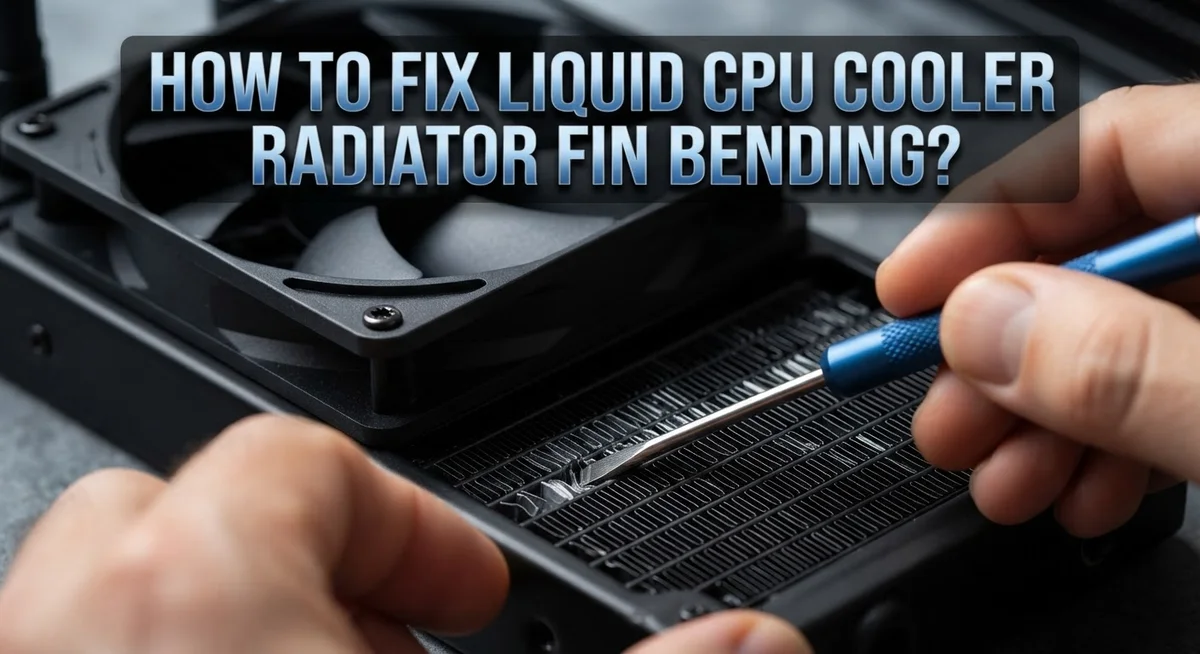
- Simple tools fix most bends. A flat-head screwdriver, a wooden tool, or needle-nose pliers can straighten fins gently. Take your time and avoid force.
- Watch for real airflow blockers. Clogged heatsinks cause more cooling trouble than bent fins ever will. Always check for dust buildup too.
- Old thermal paste matters more. If your paste is older than two to three years, replace it. This step often improves temperatures more than fixing fins.
Understanding Radiator Fins and Why They Bend
Radiator fins are thin metal strips attached to your liquid cooler’s radiator core. These fins increase surface area so heat transfers from the coolant to the air passing through. They sit close together, usually spaced just a few millimeters apart.
Fins bend easily during shipping, installation, or handling because they are made from soft aluminum or copper. A single bent fin does not stop your cooler from working. Even four or five bent fins cause almost zero performance loss because the total surface area reduction stays minimal.
Why do fins actually bend? Most bending happens before installation. Radiators get bumped in boxes or dropped during unboxing. Sometimes the plastic protective cover comes off during transport, leaving fins exposed. Installers also accidentally bend fins when forcing the radiator into tight case spaces or when removing the protective bottom cover carelessly.
Does bending matter for cooling? Not really, unless you have severe damage. A cooler with a few bent fins still moves air through the radiator effectively. The coolant still flows, heat still transfers, and your CPU stays cool. Performance tests show almost no temperature difference between a radiator with minor fin damage and a perfect one.
What actually hurts cooling performance? Dust buildup inside the radiator blocks airflow far more than bent fins ever could. Dried or old thermal paste between your CPU and cooler block causes bigger temperature problems. A pump running at low speed matters more than cosmetic fin damage.
When should you worry? Only if the bend creates a coolant leak or blocks significant airflow passages. Check for leaks immediately after noticing damage. If no liquid escapes and air flows normally, your cooler functions fine.
Does Bent Fin Damage Actually Affect Cooling Performance?
Bent fins do affect cooling performance, but only in specific situations. A single bent fin or even a few bent fins will not change your cooler’s ability to dissipate heat. The surface area loss is so small that your CPU temperatures stay the same.
The real impact depends on severity and location. If you have one to four bent fins scattered across the radiator, cooling performance remains unchanged. Your cooler works just fine. However, if multiple fins bend in the same area and block airflow passages, you might see a slight temperature increase of one to three degrees Celsius.
Airflow matters more than fin count. A radiator with some bent fins but clear airflow passages cools better than a radiator with straight fins clogged by dust. This is the key point. Dust buildup inside the radiator causes far more cooling problems than bent metal.
Check for these actual performance issues first. Old thermal paste loses effectiveness after two to three years and hurts cooling more than bent fins ever will. A clogged heatsink restricts airflow and raises temperatures significantly. A coolant leak is the only bent fin situation that demands immediate attention.
You should straighten bent fins for peace of mind, not performance. Fixing them is mostly cosmetic work. Straightening takes just a few minutes with simple tools. After you straighten the fins, verify no coolant leaks exist. Then install your cooler normally.
The bottom line is this: bent fins are annoying to see, but they do not destroy your cooling system. Focus on keeping your radiator clean and your thermal paste fresh for the best cooling results.
Tools You Need to Straighten Bent Radiator Fins
You need just a few basic items to straighten bent radiator fins. Most people already have these tools at home, so you probably won’t need to buy anything special.
A flat-head screwdriver works well for gentle fin straightening. The flat edge lets you slide between fins without causing extra damage. Push slowly and carefully to avoid bending fins in the opposite direction.
Needle-nose pliers are excellent for this job too. They give you precise control over individual fins. Grip the bent area gently and apply steady pressure to return it to its original position. Never yank or twist the fins forcefully.
A wooden tool or plastic spoon handle is actually ideal here. Wood and plastic won’t scratch your radiator or conduct electricity near your cooler. These softer materials reduce the risk of accidentally puncturing the fins or damaging the radiator core.
You’ll also want a small flashlight or headlamp. Radiator fins are tiny and close together. Good lighting helps you see exactly where the bend is and whether you’ve straightened it properly.
A magnifying glass is optional but helpful. It lets you inspect fins before and after your work. You can spot small bends that your eyes might miss otherwise.
Finally, keep a clean cloth nearby. Wipe away any dust or debris from the radiator before you start. This prevents dirt from getting pushed into tight spaces between fins.
That’s really all you need. No expensive equipment required. These common household items give you everything necessary to fix most bent fins safely and effectively.
Step-by-Step Guide to Fixing Bent Radiator Fins
Start by removing your radiator from the case if possible. This gives you better access and prevents accidental damage to other components. Place the radiator on a clean, flat surface with the fins facing upward.
Locate the bent fins using your flashlight. Mark them with a small piece of tape so you don’t miss any during the straightening process. Take your time here because rushing leads to mistakes.
Select your straightening tool based on fin accessibility. A flat head screwdriver works for wider bent areas. Needle nose pliers excel at gripping individual fins without crushing them. A wooden or plastic tool is gentler if you’re worried about scratching the metal.
Position your tool at the base of the bent fin where it connects to the radiator core. Apply slow, steady pressure to straighten it. Move upward toward the fin tip gradually. Never force the fin or bend it back and forth repeatedly, as this weakens the metal.
Check your progress frequently with the flashlight. Compare each fin to nearby unbent ones to ensure proper alignment. Work methodically through each bent section rather than trying to fix everything at once.
After straightening, inspect the radiator for any new damage or cracks. Run your finger gently along the fins to feel for sharp edges or irregularities. If you spot any leaks or see coolant residue, stop immediately and consult your cooler’s manual.
Reinstall the radiator once you’re satisfied with the straightening work. Ensure all mounting brackets align properly before tightening screws. Your radiator is now ready for normal operation.
Sealing and Reinforcing Fins with Two-Part Resin
Two-part resin offers a way to seal and reinforce bent fin areas after you’ve straightened them. This method works best when no coolant leak exists but you want extra protection against future damage.
Start by cleaning the bent fin section thoroughly. Use a dry cloth to remove dust and debris. Let the area air dry completely for at least 30 minutes. Moisture prevents resin from bonding properly to the aluminum surface.
Mix your two-part resin according to the manufacturer’s instructions. Most products require equal parts of resin and hardener. Stir slowly for 2 to 3 minutes until the mixture turns uniform in color. Avoid creating air bubbles during mixing, as these weaken the final seal.
Apply the resin directly to the straightened fin area using a small brush or applicator. Focus on the base where the fin connects to the radiator core. Work the resin into any small cracks or stress points. The resin fills microscopic gaps and hardens into a protective layer.
Let the resin cure for the full time recommended, typically 24 hours. Do not use your cooler during this period. Curing time varies by product, so check your specific instructions carefully.
Once cured, the resin creates a reinforced barrier that prevents the fin from bending again in the same spot. This layer also protects against minor impacts and vibration damage. However, resin reinforcement remains optional. Your cooler functions perfectly well without it if the fins are straightened and no leak exists.
This approach combines mechanical straightening with chemical protection for maximum durability.
Tips for Preventing Future Fin Damage
Preventing bent fins starts with careful handling during installation. Always remove the plastic protective cover before mounting your radiator into the case. This simple step prevents accidental fin compression during the installation process.
Handle your radiator with both hands when moving it. Avoid gripping the fins or placing pressure on the radiator core. Support the radiator from the sides or bottom frame instead.
Install mounting brackets correctly to avoid uneven pressure on the radiator. Tighten all mounting screws evenly in a cross pattern, similar to changing a tire. This distributes stress evenly across the radiator and prevents fins from bending under unbalanced force.
Check your case dimensions before purchasing a radiator. A radiator that fits too tightly in your case will experience constant pressure on the fins. Measure twice and verify clearance with other components like RAM sticks or case fans.
Position your radiator away from direct contact with sharp case edges or cable management points. Use rubber dampening pads under the radiator mounting points. These pads absorb vibration and reduce fin stress during normal operation.
Keep your radiator clean to prevent airflow restriction. Dust buildup forces you to increase fan speed, which creates vibration that can bend fins over time. Clean the fins gently with a soft brush every three to six months.
Store your radiator in a protective case or padded box if you need to remove it. Transport it carefully to avoid dropping or crushing. Never stack other components on top of your radiator during storage.
Regular inspection catches problems early. Check fins monthly for new bending or damage. Early detection allows you to straighten fins before they cause real issues.
Common Mistakes to Avoid When Straightening Fins
Many people make critical errors when straightening radiator fins. Understanding these mistakes helps you avoid causing more damage than you started with.
Forgetting the plastic protective cover is the most common mistake. Many coolers ship with a plastic bottom cover that protects fins during transport. Remove this cover before you start any straightening work. If you try to straighten fins with this cover attached, you’ll waste time and potentially damage the cover itself.
Another frequent error is assuming bent fins cause cooling problems. A small number of bent fins creates zero performance impact. You don’t need to straighten every single bent fin you see. Focus only on severely bent fins that actually restrict airflow.
Over correcting is equally problematic. People push too hard when straightening and accidentally bend fins in the opposite direction. Use gentle, controlled pressure instead. Work slowly and check your progress frequently with a flashlight.
Choosing the wrong tool leads to accidental damage. Metal tools can scratch the radiator or puncture fins. Use wooden tools, plastic tools, or a flat head screwdriver wrapped in cloth. These materials are soft enough to prevent gouges.
Don’t assume you need to straighten fins if your cooler performs well. Performance issues usually stem from clogged heatsinks or old thermal paste, not minor fin bending. Check these factors first before attempting any straightening.
Finally, avoid working too quickly. Rushing increases the chance of creating new bends or puncturing the radiator. Take your time with gentle, deliberate movements. If you damage the radiator during straightening, you’ve created a leak risk that wasn’t there before.
Troubleshooting: When Bent Fins Aren’t the Real Problem
Bent fins often get blamed for cooling problems, but the truth is more nuanced. A few bent fins rarely cause any real performance drop. Your cooler works fine with 1 to 4 bent fins because they only remove a small amount of surface area.
The real culprit is usually somewhere else. Before you spend time straightening fins, check if your radiator is actually clogged. Dust buildup blocks airflow far more than bent metal does. Use compressed air or a soft brush to clean the fins thoroughly. This simple step often fixes cooling issues that people mistakenly blame on bending.
Thermal paste age matters too. If your paste is older than 2 to 3 years, it loses effectiveness. Old paste creates a thermal barrier between your CPU and cooler, reducing heat transfer. Replacing it costs little and takes minutes. This alone might solve your temperature problems.
Verify no leaks exist before assuming bent fins are harmless. A functioning cooler with no leaks performs well despite minor fin damage. Check for drips or moisture around the radiator and pump. If everything stays dry, your cooler is safe to use.
Also inspect your mounting brackets. Uneven pressure from poor installation can reduce contact between the cooler and CPU. Loose screws or misaligned brackets create air gaps that hurt performance. Tighten everything securely and check alignment.
Finally, monitor your actual temperatures with software. If your CPU runs cool, bent fins are purely cosmetic. If temperatures are high, look for clogging, old paste, or mounting issues first. Straightening fins should be your last resort, not your first step.
Final Thoughts
Bent radiator fins look worse than they actually are. Your cooler works fine even with a few bent fins here and there.
Cosmetic issues rarely translate to real cooling problems. Unless you have severe damage across many fins, your temperatures stay normal.
Fixing minor bends takes just a few minutes. Grab a flat head screwdriver or a plastic tool and gently straighten each fin.
Remember to remove the plastic bottom cover first. This small step saves you from extra frustration during the process.
Always check for leaks before you start any repair work. A cooler with no leaks remains safe to use, bent fins or not.
If you want extra protection, apply resin to badly bent sections. This creates a barrier that helps prevent future bending in the same spot.
Don’t rush the straightening process. Slow, careful movements protect your fins from further damage.
Patience matters more than speed here. Take your time and check your work as you go.
Most cooling problems come from other sources anyway. Dust buildup, old thermal paste, and poor airflow cause more issues than bent fins ever will.
Before blaming your fins, check these other factors first. You might find the real problem has nothing to do with fin damage at all.
Your radiator can handle some cosmetic damage without any performance loss. Focus on function over perfect appearance.
Keep monitoring your temperatures after any repair. This helps you confirm everything works as expected.
Simple tools and basic care go a long way. With the right approach, you can fix bent fins quickly and keep your cooler running smoothly for years to come.
Frequently Asked Questions
Will bent fins actually hurt my cooling performance?
No. One to four bent fins cause zero cooling difference. Your radiator loses only a tiny amount of surface area. The cooler stays fully functional as long as there are no leaks. Most people worry about bent fins when the real problem lies elsewhere, like dust buildup or old thermal paste.
Is it safe to use my cooler if the fins are bent?
Yes, it is safe. Bent fins are cosmetic damage. Check for leaks first by inspecting the radiator closely. If you see no fluid seeping out, your cooler works fine. Many users run systems with bent fins for years without any issues.
What’s the easiest tool to straighten bent fins?
Use a flat-head screwdriver, wood tool, or needle-nose pliers. Plastic or wood tools work best because they won’t puncture the aluminum fins. Avoid metal tools that could scratch or damage the radiator. Work slowly and gently. Remember to remove the plastic protective cover before you start.
Should I straighten my fins if my cooler works fine?
No. If your temperatures are normal and your cooler performs well, leave the fins alone. Straightening is purely cosmetic. Bent fins that don’t affect cooling performance don’t need fixing. Save your time and effort for actual problems like clogged heatsinks or aging thermal paste.
What if straightening doesn’t fix my cooling problems?
Then bent fins weren’t the problem. Check your radiator for dust and debris. Verify your thermal paste is fresh (replace if over two to three years old). Inspect your mounting brackets for proper contact. Monitor your actual temperatures with monitoring software to confirm if cooling is truly an issue.

Hi, I’m Jessamine Rowell, the founder and voice behind ResizeMake (https://resizemake.com/), a space where I share my love for technology with the world. I write detailed and honest reviews on the latest tech products, gadgets, electronic devices, and trending Amazon items to help readers make smarter buying decisions.