How To Fix Smart Smoke Detector Battery Contact Corrosion?
Does your smart smoke detector chirp for no reason? Or maybe it stays silent when it should not?
The problem might not be the device itself. It could be battery contact corrosion.
Corrosion builds up on metal contacts over time. This buildup blocks the electrical connection between your battery and detector. Your device cannot get power properly, even with a fresh battery inside.
In a Nutshell
- Never touch corrosion with bare hands. Use a small brush or cloth to protect your skin from the residue.
- Dip a cotton swab in white vinegar. This neutralizes the corrosion buildup on the contacts. Gently rub the affected area until it loosens.
- Follow up with isopropyl alcohol. This step removes any leftover residue after the vinegar treatment. Your contacts should look clean and clear now.
- Dry the area completely. Moisture left behind can cause new corrosion fast. Give it a few extra minutes to air dry fully.
- Insert fresh alkaline batteries only. Old or weak batteries will not solve the problem. New batteries ensure a strong connection.
- Avoid rushing the drying step. This mistake causes many repeat corrosion issues. Patience here saves you future headaches.
What Causes Battery Contact Corrosion in Smart Smoke Detectors
Battery contact corrosion happens when moisture and air react with the metal terminals inside your smoke detector. This chemical reaction creates a layer of oxidized material that blocks electrical flow between the battery and the device.
Several factors speed up this process. High humidity environments are the biggest culprit. Bathrooms, kitchens, and basements naturally have more moisture in the air. This moisture seeps into the battery compartment over time. Even small amounts of water vapor can start the corrosion chain reaction.
Old batteries also contribute to the problem. As batteries age, they leak small amounts of chemical fluid. This fluid sits on the metal contacts and accelerates corrosion. Batteries left in the detector for too long make this worse.
Temperature swings create another issue. When your home gets hot and cold repeatedly, condensation forms inside the detector. The metal expands and contracts, which cracks the protective coating on battery terminals. Corrosion then takes hold in these tiny cracks.
Poor ventilation around the detector matters too. Stale air with trapped moisture increases corrosion risk. Detectors placed in corners or enclosed spaces face this challenge more often.
Alkaline battery leakage is surprisingly common. Some batteries release their internal chemicals before fully draining. This acidic material eats away at the metal contacts quickly.
Finally, dust and debris inside the compartment trap moisture against the contacts. When dust mixes with humidity, it holds water longer than a clean surface would. This extended contact time speeds up the corrosion process significantly.
Understanding these causes helps you prevent future problems. Keeping the detector dry and replacing batteries regularly stops most corrosion before it starts.
Signs Your Smoke Detector Has Corroded Battery Contacts
Your smart smoke detector may show several warning signs before it stops working completely. Learning to spot these signs helps you fix the problem early.
Chirping sounds at odd times indicate battery contact issues. The device struggles to read power levels when corrosion blocks the connection. You might hear beeping even with fresh batteries installed.
The detector may fail to respond during test mode. Press the test button and listen for the alarm. If nothing happens, corroded contacts likely prevent power from reaching the sensor. This is a serious safety concern that needs immediate attention.
Visual indicators on the display tell you something is wrong. Some smart detectors show low battery warnings even after you insert new batteries. The screen might flicker or display error codes. These messages suggest the electrical connection is compromised.
A completely silent detector is dangerous. Your smoke detector should chirp once monthly during normal operation. Silence means power is not flowing properly through the contacts.
You might notice the device feels loose or unstable. Corrosion can affect how the battery sits in its compartment. A loose fit prevents good electrical contact between the terminals and the battery.
Stale or musty odors near the detector signal moisture problems. This smell often precedes visible corrosion. Moisture creates the perfect environment for rust to form on metal surfaces.
The detector may reset unexpectedly or lose your settings. Intermittent power loss from corroded contacts causes this frustrating behavior. Your customized preferences disappear when the connection drops.
These signs all point to one solution: cleaning the battery contacts. Catching corrosion early prevents complete device failure and keeps your home safe from fire hazards.
Tools and Materials You’ll Need Before You Start
Gather the right tools before you start cleaning your smart smoke detector’s battery contacts. You will need items you probably have at home already.
Start with cleaning supplies. Get white vinegar or isopropyl alcohol. Both work well for neutralizing corrosion. White vinegar is gentler, while isopropyl alcohol dries faster. Choose whichever you have available.
You need cotton swabs or Q-tips for precise application. These let you reach small contact areas without spreading liquid everywhere. Small cotton balls work too if swabs are unavailable.
Grab a small soft brush. A toothbrush works perfectly for this job. Use one you do not need anymore. The brush helps loosen stubborn corrosion without scratching the metal contacts.
Keep clean, dry cloths nearby. Paper towels or microfiber cloths both work. You will use these for drying after cleaning. Make sure they are lint-free to avoid leaving fibers behind.
Prepare fresh alkaline batteries. Have them ready before you start. You will need these after cleaning the contacts. Old or weak batteries will not fix the problem.
Wear protective gloves if you have them. This protects your skin from corrosion residue. Latex or nitrile gloves work fine. Bare hands can pick up harmful chemicals.
Set up a well-lit workspace. Good lighting helps you see the corrosion clearly. A flashlight or desk lamp works great. You need to spot every corroded area.
Finally, keep a small container nearby for your supplies. This keeps everything organized and prevents spills. A cup or small bowl works well.
Having these items ready makes the cleaning process smooth and fast. You will finish the job without running around looking for supplies.
Step-by-Step Guide to Cleaning Corroded Battery Contacts
Start by powering off your smoke detector and removing it from the ceiling or wall. Open the battery compartment carefully. Never touch corroded areas with your bare hands, as corrosion can irritate your skin.
Put on your protective gloves before proceeding. Use a small soft brush to gently remove loose corrosion and debris from the battery contacts. Brush away any white, green, or blue crusty material you see. Work slowly to avoid damaging the delicate metal terminals.
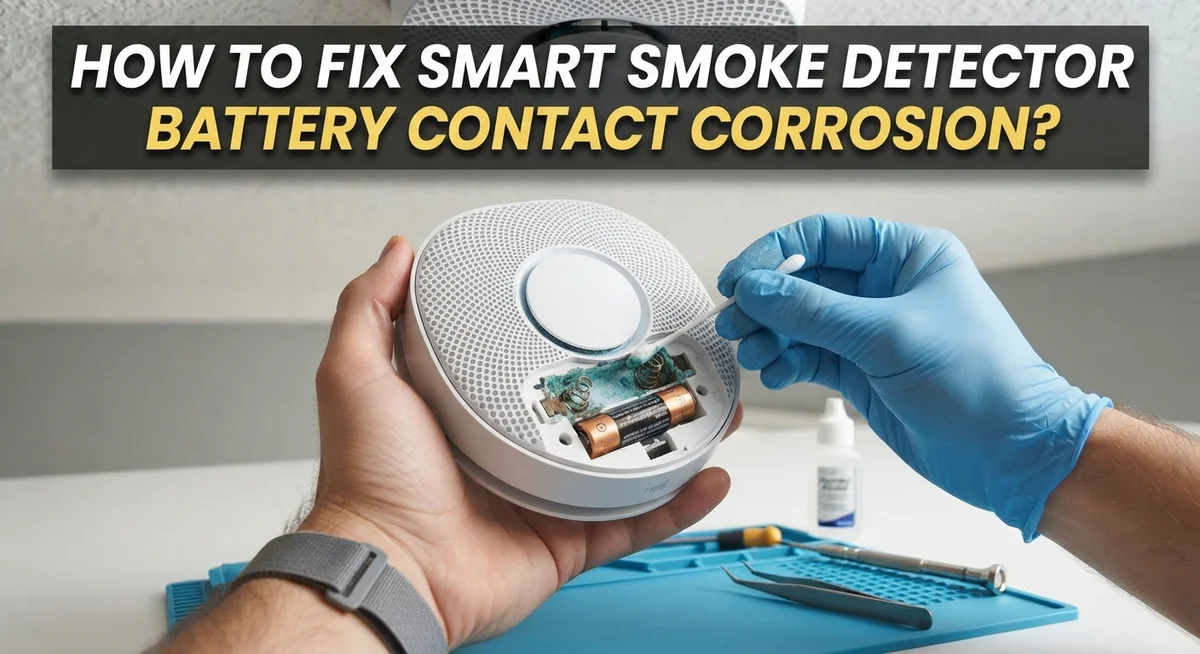
Dip a cotton swab into white vinegar. Apply it directly to the corroded battery contacts. The vinegar neutralizes the corrosion through a chemical reaction. Let it sit for about 30 seconds. You’ll notice the corrosion starting to break down.
Use a fresh cotton swab dipped in isopropyl alcohol to remove the remaining residue. This second step cleans away what the vinegar loosened. Wipe each contact thoroughly until they look shiny and clean.
This drying step is critical. Use a clean, dry cloth to absorb all moisture from the battery compartment. Leave the compartment open for 5 to 10 minutes to air dry completely. Any remaining moisture can cause corrosion to return quickly.
Insert fresh alkaline batteries into the clean contacts. Make sure they sit flush and secure. Close the battery compartment and reattach the detector to your wall or ceiling.
Test your smoke detector immediately. Press the test button and listen for the alarm sound. A successful test confirms your cleaning worked and the detector functions properly again. Your smart smoke detector should now operate normally with proper battery contact connection restored.
How to Safely Neutralize and Remove Corrosion Residue
Corrosion on battery contacts blocks the electrical connection your smoke detector needs to function. The good news is that you can safely neutralize and remove this buildup using common household solutions.
Start by protecting yourself. Wear gloves before touching any corroded areas. Corrosion residue can irritate your skin, so keeping a barrier between your hands and the damaged contacts matters.
Apply white vinegar first. Dip a cotton swab into the vinegar and gently rub it across the corroded battery contacts. The vinegar’s acidity neutralizes the corrosion chemically. You’ll see the buildup begin to break down. Let the vinegar sit for about 30 seconds on stubborn corrosion spots.
Next, use isopropyl alcohol to remove what remains. Dip a fresh cotton swab into the alcohol and wipe away the loosened residue. This second step ensures you remove all corrosion particles completely. Alcohol evaporates quickly, which helps with the drying process.
Drying is absolutely critical. Use a clean, dry cloth to absorb all moisture from the battery compartment. Any leftover liquid can cause new corrosion to form immediately. Press the cloth gently into corners where moisture hides. Wait a full minute before proceeding further.
Inspect the contacts carefully. They should look shiny and clean, not dull or discolored. If corrosion remains, repeat the vinegar and alcohol steps once more.
Only after everything is completely dry should you insert fresh alkaline batteries. New batteries work better than old ones after cleaning. Test your detector right away to confirm it responds properly. Your smoke detector should now function normally with restored battery contact connection.
Choosing and Installing the Right Replacement Batteries
Choosing the right replacement batteries makes a real difference in your smart smoke detector’s performance. After cleaning corroded contacts, you need fresh alkaline batteries to restore proper function. Alkaline batteries work best because they provide consistent power and resist corrosion longer than other types.
Check your detector’s manual to find the correct battery size and type. Most smart smoke detectors use standard sizes like AA or 9V batteries. Using the wrong size creates loose connections and prevents your detector from working properly.
Buy batteries from reliable sources to ensure quality. Cheap or old batteries may already have internal corrosion issues. Fresh batteries from trusted retailers give you the best performance and longevity.
Before inserting new batteries, inspect the battery compartment one more time. Make sure the contacts are completely dry and free of any vinegar or alcohol residue. Even small moisture drops can cause future corrosion problems.
Insert batteries slowly and carefully into the compartment. Push them in firmly until you hear or feel a click. Improper insertion leaves gaps that interrupt electrical flow.
Test your detector immediately after inserting fresh batteries. Most smart detectors have a test button you can press to verify function. You should hear a loud alarm sound within seconds. If nothing happens, remove the batteries and check the contacts again for remaining corrosion.
Some detectors display battery status on a connected app or control panel. Check this status to confirm your new batteries registered properly. Low battery warnings should disappear once fresh batteries are installed and recognized by the system.
Mistakes to Avoid During the Cleaning Process
Making mistakes during the cleaning process can damage your smoke detector or leave corrosion behind. Here are the errors you need to avoid.
Never touch corroded battery contacts with your bare hands. Corrosion contains acidic compounds that can irritate your skin. More importantly, your skin oils transfer to the contacts and create new problems. Always wear protective gloves when handling corroded areas.
Skipping the drying step is a critical mistake. Many people clean the corrosion but rush to insert new batteries while moisture remains. Wet contacts cause short circuits and prevent your detector from working properly.
Don’t use old or damaged batteries after cleaning. People often assume that cleaning the contacts means old batteries will work again. This is false. Corroded contacts need fresh alkaline batteries to function correctly. Old batteries may have internal damage that prevents them from holding a charge.
Incomplete residue removal causes the corrosion to return quickly. Some people apply vinegar but don’t follow up with isopropyl alcohol. This leaves acidic residue on the contacts. Always use both solutions in sequence to neutralize and remove all corrosion completely.
Avoid using metal tools that scratch the contact surfaces. Scratches create weak spots where corrosion returns faster. Use soft brushes or cloth instead.
Don’t ignore visible damage to the battery compartment itself. If you see cracks or warping, the detector may need replacement. Cleaning won’t fix structural problems.
Finally, never test your detector with wet hands or damp fingers on the contacts. This reintroduces moisture and undoes your cleaning work. Wait until everything is completely dry before touching anything inside the compartment.
Preventing Future Corrosion on Your Smoke Detector
Preventing future corrosion on your smoke detector starts with understanding what causes it in the first place. Battery leakage and moisture are the main culprits that create corrosion inside the compartment. You can stop this from happening by taking a few simple steps.
First, replace your batteries regularly before they fully drain. Batteries that sit too long in your detector are more likely to leak. Check your smoke detector’s manual to see how often you should change batteries. Most detectors need fresh batteries once or twice per year.
Second, store your smoke detector in a dry location. Moisture from bathrooms, kitchens, or humid areas speeds up corrosion. If your detector is near a water source, consider moving it to a drier spot. Keep the battery compartment sealed properly. A loose cover lets moisture seep inside.
Third, use high quality batteries from reliable sources. Cheap or damaged batteries fail more often and leak faster. Always check battery expiration dates before inserting them into your detector.
Fourth, inspect your smoke detector every few months. Open the battery compartment and look for any white, blue, or green discoloration on the contacts. Catching corrosion early prevents bigger problems later.
Finally, keep the battery compartment clean and dry at all times. After you insert fresh batteries, make sure the cover closes completely. This creates a barrier against dust and moisture.
By following these prevention steps, you’ll avoid the frustration of dealing with corroded contacts again. Your smoke detector will stay in working order and keep your home safe for years to come.
Final Thoughts
Fixing battery contact corrosion is a simple task once you know the right steps. Vinegar and isopropyl alcohol remain your best tools for neutralizing and cleaning corrosion. With patience and care, your smart smoke detector can work like new again.
Remember that safety comes first during this process. Always use gloves or a cloth when handling corroded parts. Your health matters more than saving a few minutes.
Regular maintenance prevents most corrosion problems from happening. Check your detector every few months. This small habit saves you time and stress later.
A smoke detector protects your home and family every single day. Taking a few minutes to clean corroded contacts keeps this protection active. Don’t let a small issue turn into a bigger safety risk.
If corrosion keeps returning despite your best efforts, consider checking the detector’s overall condition. Sometimes an aging unit shows more than just battery issues. In such cases, a replacement might serve you better than repeated fixes.
Cleaning corrosion is not complicated, but it does require attention to detail. Skipping steps or rushing through the process often leads to repeat problems. Take your time and follow each step carefully.
Your smart smoke detector plays a critical role in home safety. Keeping it functional through proper battery care is a small price for peace of mind. A few minutes of maintenance can make a real difference.
In the end, simple cleaning solutions solve most corrosion problems. You don’t need special equipment or expensive products. Just some basic supplies and a little patience will get the job done right.
Frequently Asked Questions
Can I use baking soda to clean battery contacts on my smoke detector?
Baking soda works, but it’s not the best choice. White vinegar or isopropyl alcohol neutralize corrosion more effectively. Baking soda leaves a residue that can interfere with electrical connections. If you only have baking soda available, mix it with a small amount of water to form a paste, apply it with a cotton swab, and dry completely afterward.
How long should I wait after cleaning before putting new batteries in?
Wait at least 10 to 15 minutes after your final cleaning step. This gives the detector time to dry completely. Moisture inside the battery compartment prevents proper contact between the batteries and the terminals. Check the compartment with a flashlight to confirm it looks completely dry before inserting fresh batteries.
What type of batteries should I use after cleaning the corrosion?
Use fresh alkaline batteries from a reliable source. Never reuse old batteries or ones that show signs of damage. New alkaline batteries provide consistent power and reduce the risk of future leaks that cause corrosion. Replace them every 6 to 12 months, depending on your detector’s specifications.
Why does corrosion keep coming back even after I clean it?
Corrosion returns when you don’t dry the compartment fully or when you use low quality batteries. Battery leaks cause most corrosion problems. Store your smoke detector in a dry location away from humidity. Check the battery compartment every few months and replace batteries before they completely drain.
Is it safe to touch corroded battery contacts with my fingers?
No. Corrosion contains acidic compounds that irritate skin. Always use tools like cotton swabs, cleaning brushes, or cloth strips instead. Wear gloves if you prefer extra protection. This keeps your hands safe and prevents spreading corrosion residue around the detector.

Hi, I’m Jessamine Rowell, the founder and voice behind ResizeMake (https://resizemake.com/), a space where I share my love for technology with the world. I write detailed and honest reviews on the latest tech products, gadgets, electronic devices, and trending Amazon items to help readers make smarter buying decisions.